WordPress uptime monitoring for agencies: what to watch across client sites
When you look after a handful of WordPress sites, you notice problems yourself. At twenty, the first person to notice is usually a client, and they tell you by email with a subject line like “site not working?”
Monitoring is meant to reverse that order. But a lot of agencies set it up once, point it at every homepage, and assume the job is done. Then a checkout breaks for a week while the homepage keeps answering with a cheerful 200. This post is about setting it up so that does not happen, without turning your inbox into a wall of alerts.
What an uptime check actually tells you
A basic uptime monitor requests a URL from outside your hosting and records what came back. If the server answers with a success code in a reasonable time, the site is “up.” That is a useful fact. It means DNS resolves, the certificate is valid, the web server is running and PHP produced a page.
It says nothing about whether the page is the right page, whether the buttons work, or whether anything past the front door still functions. A WordPress site with a fatal error in the checkout template and a perfectly healthy homepage is “up” by this measure all day.
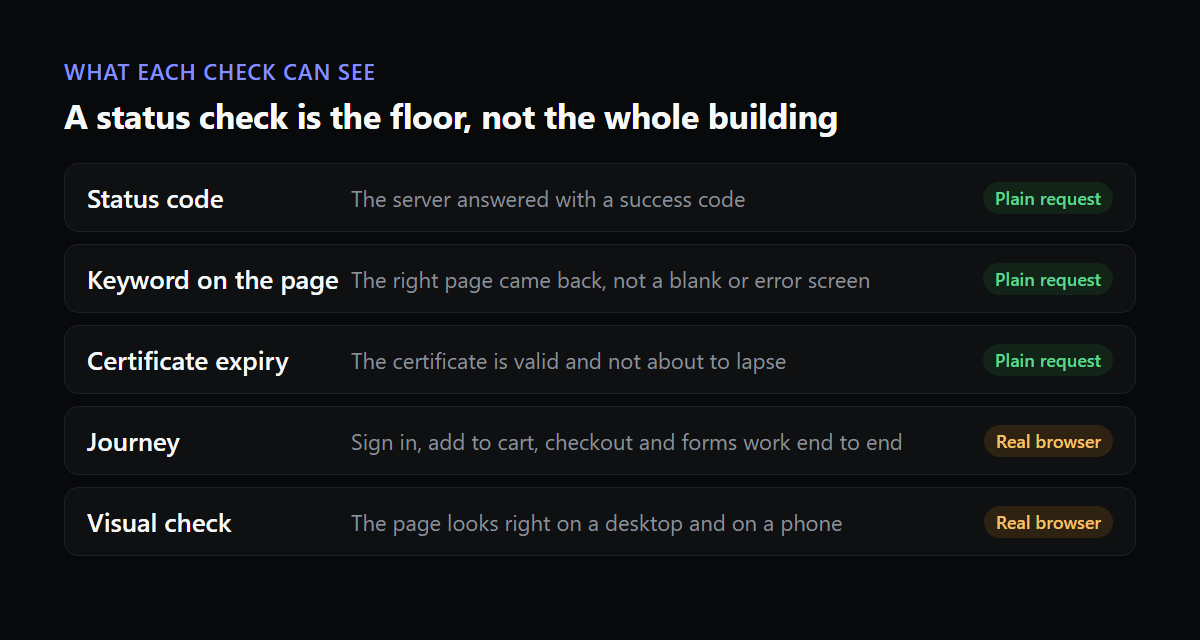
So think of the plain check as the floor. It is cheap, it runs often, and it catches the loud failures: the host went down, the domain expired, the certificate lapsed. You want it on every site. You do not want it to be the only thing on any site that earns the client money.
Decide what each site is for
Before choosing tools, sort your client sites by what a failure would cost. Most portfolios fall into four rough groups.
- Brochure sites, where the job is to be found and to show a phone number or a contact form.
- Lead-generation sites, where a form that silently stops sending is the real risk.
- Shops, where the cart and checkout matter more than any other page.
- Membership or booking sites, where signing in is the product.
The right checks follow from that. A brochure site needs uptime and a certificate watch. A lead-generation site also needs someone to submit the form on a schedule and confirm it arrives. A shop needs the path from product page to order confirmation walked end to end. A membership site needs a login that actually lands on the account page.
| Check | Catches | Misses |
|---|---|---|
| HTTP status | Host down, expired domain, server errors | Broken pages that still return 200 |
| Keyword on the page | Blank pages, error screens, a hacked homepage | Anything behind a click |
| SSL expiry | A certificate about to lapse | Everything else |
| Scripted journey (login, cart, checkout, form) | Failures in the steps that make money | Pages you did not script |
| Visual check on desktop and phone | Layouts that break after an update | Back-end faults with no visible change |
How often to check
More often is not automatically better. The useful question is how long you can tolerate not knowing. If you check every five minutes, the longest a full outage can go unseen is a bit over five minutes. At thirty minutes it is a bit over thirty.
For scale, a monthly uptime target of 99.9 percent allows about 43 minutes of downtime in a 30 day month. If you promise a client that number and check every 30 minutes, you cannot even measure it properly. Short intervals on the sites with an uptime promise attached, longer ones on the rest, is a sensible split.
Two settings matter more than the interval itself. First, a failure should be checked again before it turns into an alert. One slow response at 3am is not an incident, and agencies that alert on the first miss learn to ignore their own alerts within a month. Second, a site that keeps going up and down deserves one flapping notice, not forty messages.
Who gets woken up
An alert that goes to a shared inbox is an alert nobody owns. Decide, per site, who gets the message first and who is next if they do not react. Most small agencies can do this with a simple rota: one person on call for the week, with the whole list of sites under them.
Route by severity too. A failed checkout on a shop is a phone call. A certificate with fourteen days left is an email on Monday morning.
Planned work should be quiet
Updating forty sites on a Tuesday evening will trip every monitor you have. If the alerts for that window are not silenced, the on-call person learns to dismiss them, and then dismisses the one that mattered. Use maintenance windows, and keep them short and specific so a real failure outside the window still gets through.
Plugin-based monitors and external ones
A monitor that lives inside WordPress has one obvious weakness: when the site is down, so is the monitor. It also adds a little load to every site it runs on. External monitoring checks from outside your hosting, which is what you want for the question “can a customer reach this.”
Plugins still have a place. A small plugin on the site can report things an outside check cannot see, such as which plugins and themes updated and when. That history is what lets you answer “what changed before it broke” in seconds instead of an hour of guessing. Keep the checking outside and let the plugin supply the record of changes.
Check from more than one place
A single monitoring location is a single opinion. If the route between that location and your host has a bad five minutes, you get an alert for a site that is fine for everyone else, and after a few of those the alerts stop being believed. Good tools confirm a failure from a second location before they send anything. The same property works in your favour the other way: a fault that only affects one region, such as a CDN node or a DNS provider having a bad hour, is something a single-location check will never see.
If your clients sell to a particular country, make sure at least one check comes from somewhere that looks like their customers. A site that loads quickly from Frankfurt and takes ten seconds in Lahore is slow for the people it exists to serve.
The quiet failures: domains, DNS and certificates
Some of the worst outages are boring ones. A domain that was registered on a card that has since expired. A certificate that renewed itself for years and stopped after the server was moved, because the renewal job did not come with it. A DNS record changed by someone at the client’s company who was only trying to set up email.
These are cheap to watch and expensive to miss. Watch certificate expiry on every site and get a warning at 30 days, with another at 14 and at 7. Keep a list of which client owns which domain and where it is registered, because the day a domain lapses is a bad day to be searching for the login. If a client registered their own domain, tell them in writing that renewal is theirs, or take it over.
Subdomains and the pages nobody remembers
The homepage is rarely the only thing that matters. A shop may take payment on a separate checkout address. A booking site may call a third-party calendar. A membership site may send everyone to a login on a subdomain. List the addresses a customer touches on the way to paying or signing in, and make sure each of them is covered by something.
The reverse deserves a look too. A staging copy left open to the public can be indexed by search engines and compete with the real site, and an old test subdomain can sit unpatched for years. A quick audit of what is publicly reachable on each client’s domain is a reasonable first job when you take a site on, and it fits well alongside the care plan you are already offering.
When a monitor is not enough
Monitoring tells you something broke. It does not fix it, and it does not tell you why. For the “why,” the fastest sources are the update history of the site and the error log, which is where our recovery checklist starts. For the “is it really working” question, checking more than the status code is the next step. And for shops specifically, tracing a broken checkout is a skill worth rehearsing before you need it.
Tell the client what you watched
Monitoring only helps the relationship if the client can see it. A monthly line showing uptime, any incidents with their cause, and what was fixed is usually enough. Some agencies also give each client a public status page, so “is it just me?” has an answer that does not involve calling you. We wrote more about that in what to put in a maintenance report.
A sensible starting point
If you are starting from nothing, do it in this order. Put plain uptime and certificate checks on every site this week. Then pick the three sites that make the most money for their owners and add a journey check for the step that matters: checkout, login or the contact form. Add the rest as you get to them. A few well-chosen checks that people trust beat a hundred that everyone mutes.
Website is Up is built for this kind of portfolio. It checks from outside, confirms a failure before it alerts, runs journeys such as sign in, add to cart and checkout, and keeps your client reports in your own colours. You can start with one site for free and see how the checks work on your own work.