A care plan is a monthly fee for keeping a website healthy. It is easy to describe and surprisingly easy to get wrong, usually by promising things you cannot control or by pricing it as if updates took no time.
This is a guide to what belongs in one, what to leave out, and how to keep the promises you do make.
Start with what you can really deliver
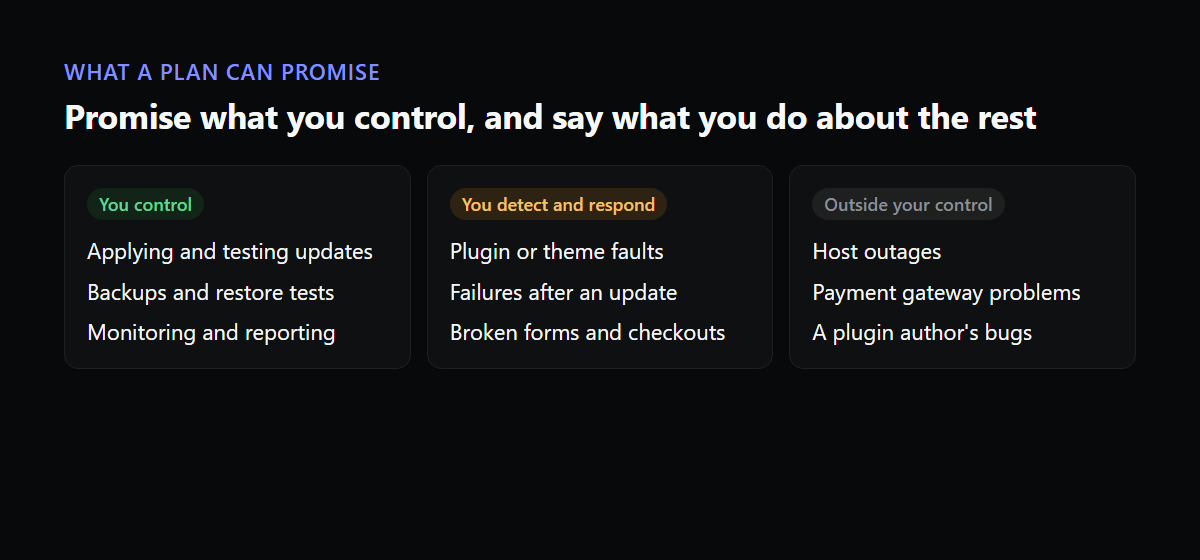
The work in a plan comes down to a few recurring jobs. Applying updates to WordPress core, plugins and themes. Keeping backups and knowing they restore. Watching the site so you hear about problems first. Basic security hygiene. Optionally, a small block of time for edits.
Nothing in that list depends on someone else’s system, and plenty of what can go wrong does. Your host, the payment gateway and the plugin authors all sit outside your control. A good plan describes what you do about their failures, which is detect them, tell the client and respond, and never claims you can prevent them.
Updates are the main job, so price the testing
Clicking Update All takes a minute. Doing it responsibly takes longer: a backup beforehand, the updates applied, then a check that the pages and flows that matter still work. On a shop that means a test checkout. On a membership site it means a login. The testing is the work you are charging for, and the number of minutes it takes per site is the base of your price.
A workable way to price it is to estimate the minutes per site per month for updates, testing and reporting, multiply by your hourly rate, and add a margin for the months that go wrong. Do that for a simple brochure site and for a complex shop separately. Then you have at least two tiers that reflect real effort and not only a feature list.
If you are starting out, begin with a single plan and one price, and add tiers only after you have looked after a dozen sites and know where the work really goes. Inventing three levels before you have the data usually produces levels that differ in names and not in effort.
What to promise about uptime
Avoid promising a percentage unless you control the hosting. If the client’s site sits on a shared host you cannot influence, a 99.9 percent promise is a number you cannot keep. A promise you can keep is about detection and response: you check the site at a stated interval, you are told within minutes of a confirmed failure, and you start work within a stated time.
Be careful with response times as well. “We respond within one hour” needs a person who can respond in the hour. If you are one developer, say business hours, and say what the after-hours arrangement is, even if the arrangement is that it waits until morning.
Monitoring that matches the promise
The monitoring you attach to the plan decides what you can honestly claim. A plain uptime check supports “we know if the site is down.” It does not support “we know if the shop works.” If you want to promise the second, you need checks that sign in, add to cart and check out. Our post on why a site can be up and still broken goes through the difference.
Decide in advance who receives an alert and what they do. An alert with no named owner is not part of a service. Write the on-call arrangement into your own operating notes even if you do not put it in the contract.
What to leave out, or limit
- Unlimited content edits. Someone will test the word “unlimited.” Offer a block of hours or a number of small changes per month.
- Fixes for problems caused by the client’s own changes, such as installing a plugin themselves. Offer these at an hourly rate.
- Recovery from a site that was already hacked before the plan began. Treat it as a separate project.
- Guarantees about search rankings or speed scores. Neither is something you fully control.
Write down the scope
One page that lists what is included, what is not and how an emergency is handled prevents most arguments. Cover how the client reports a problem, what counts as an emergency, whether emergency work outside the plan is billed, and what happens if a plugin they depend on is abandoned by its author. Clients rarely object to a clear scope. They object to finding out about the limits during an incident.
Points worth writing into the agreement
This is not legal advice, and a lawyer should look at your actual terms, but a few points come up often enough to plan for. How much notice either side gives to end the plan. What happens when a client does not pay. Who holds the credentials, and who is responsible for renewing the domain and the hosting. A limit on your liability for losses that follow from a failure in something you did not control, such as the host or a payment gateway. And a plain statement that monitoring detects problems and does not prevent them.
Clients tend to accept limits that are written clearly and explained once, and they tend to dislike the same limits when they are discovered mid-incident.
How to behave during an incident
The way you communicate matters nearly as much as how fast you fix. Acknowledge the problem as soon as you know about it, even if you do not yet know the cause. Say when you will update them next, and then do. Keep the language plain. When it is fixed, send a short note about what happened and what changes. Our recovery checklist includes a template for that message.
Show the work every month
The plan renews because the client believes it is worth paying for, and the client only believes that if they can see it. A short monthly report with the summary, the updates, any incidents and what is next does most of that. We wrote up what to put in it.
Tiers that reflect real differences
Most agencies end up with two or three levels, and the best way to separate them is by how much risk and work each site carries, not by a list of features that sounds good on a pricing page.
| Level | Typical site | What changes in the plan |
|---|---|---|
| Basic | Brochure site, few plugins | Monthly updates, backups, uptime and certificate monitoring, short report |
| Standard | Lead-generation or small membership site | Everything above, plus form and login checks, faster updates for security issues |
| Commerce | Online shop | Checkout tested after every update, tighter response commitment, a status page, a block of hours |
The point of the table is the third column. Each level adds work and a promise you can keep, and the fee follows from the work.
Taking on a new site
Do an audit before the first month, and charge for it or fold it into a setup fee. Check the PHP version, how many plugins are installed, how many of those are no longer maintained, whether the backups work and where they go, who owns the domain and the hosting, and whether a staging copy exists. Write down what you find. Sites that arrive neglected are costlier in the first few months than in the rest, and the audit is what tells the client why.
Agree at the same time which checks will run. For a shop, that means a checkout test. For a membership site, a login. For everyone, the basics from our monitoring guide. If the checks are in place from day one, you have a baseline to compare against when something changes.
When a client leaves
Eventually a client does. Decide in advance what a clean handover looks like: access, a copy of the site and its backups, a list of the plugins and their licences, and notes on anything unusual. A tidy offboarding costs an hour and leaves behind a former client who recommends you. A messy one is the version they tell their next agency about.
Review the plan every year
Costs and risks move. Plugins you relied on get replaced, hosts change, and a brochure site grows a shop. Once a year, look at each client’s actual time against what the plan assumed, and adjust the fee or the scope for the ones that have drifted. Raising a price with a clear reason and some notice is easier than discovering you have been running a site at a loss for two years. A good monthly report makes that conversation easier, since it shows the work behind the number.
Where tooling fits
The more sites you carry, the more the jobs above shift from craft to routine, and routine is where tools earn their cost. Website is Up covers the monitoring and the reporting side: it checks sites from outside, runs sign in and checkout journeys, sends alerts, and builds branded client reports and status pages. One site is free, which is enough to try it on the client you worry about most.