Most clients on a care plan do not read the monthly report. What they get is often a long list of version numbers and green ticks that they have no way of judging. Twelve months of “all good” and a renewal invoice is a poor way to show what you did.
A better report is shorter, says what happened in plain language, and is honest about the month that was not quiet. Here is what to put in it.
Start with a three line summary
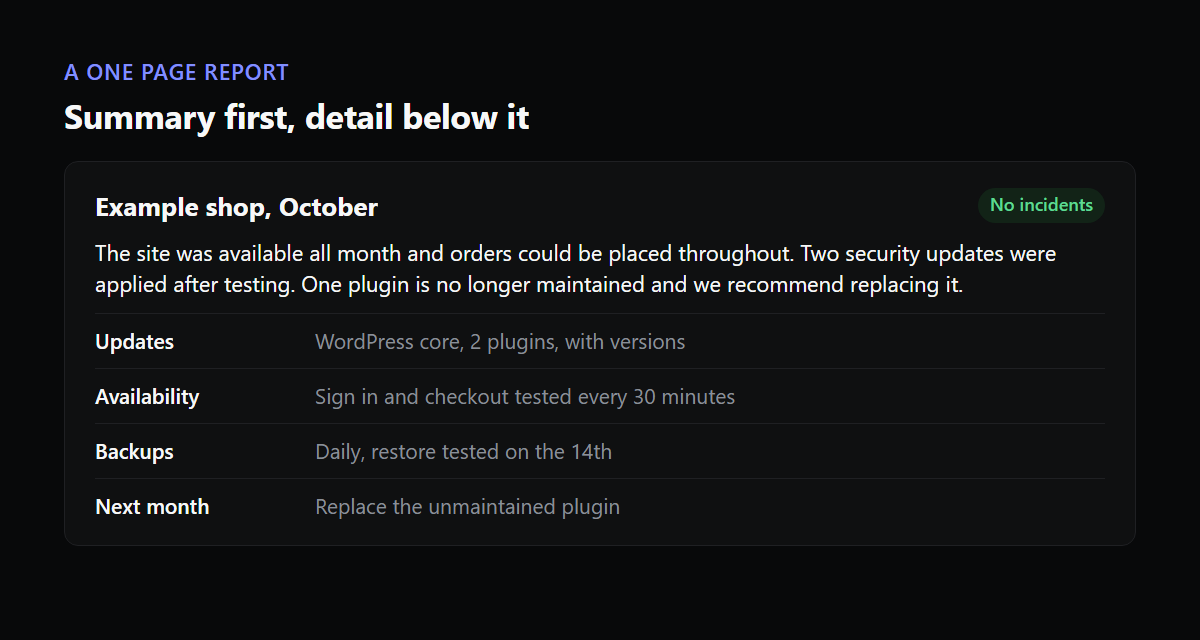
The client may read nothing else, so write the top of the page for them. Say whether the site was available all month, whether anything went wrong, and whether anything needs their decision. For example: the site was available for the whole month, two plugins had security updates which we applied after testing, and one plugin is no longer maintained and we would like to talk about replacing it.
Everything below that is reference. If the summary is good, nobody minds that the rest is dense.
Updates, with versions
List what changed, grouped as WordPress core, plugins and themes, each with the version it went from and to. This is the part that proves the work happened, and it is also your own record. When something breaks in the second week of next month, the list tells you what moved.
Skip the long inventory of every plugin that did not change. A page of forty unchanged plugins hides the three that did.
Uptime, with the incidents explained
Give the availability figure for the month, and then deal with any gap. If the site was down for 22 minutes, say when, say why, and say what you changed so it does not repeat. A report that shows 99.9 percent with no explanation looks like a number someone typed. A report that explains the one bad evening looks like someone is paying attention.
Be specific about what you measured. “Uptime” that only counts the homepage answering is a narrow claim. If you also test that checkout, login or the contact form work, say so, and report those separately. Clients understand “the shop could take orders for the whole month” much better than a percentage.
Backups, and proof they can be restored
“Backups ran” is the minimum. Better is the date of the latest backup, how long you keep them, and when you last restored one to check it works. Many agencies find out whether a backup is usable only when they need it. A line saying you tested a restore in a given month is worth more to a client than ten ticks.
Security, kept proportionate
Mention the scans that ran and anything they found, and what you did about it. If nothing was found, a single line is enough. Resist padding this section with counts of blocked login attempts. Those numbers are large, they look impressive and they mean little, because the volume of automated attempts is similar on nearly every site on the internet.
What is coming up
End with one to three recommendations. A plugin that has not been updated in two years. A certificate that renews in March. A page speed problem on the biggest landing page. This turns the report into a conversation about next month, and it is the honest place to raise work that is outside the plan.
How often to send it
Monthly is the usual rhythm and a good default, because it matches how clients think about the fee. A shop in its busy season may want a quick note each week. A small brochure site may do fine with a report every quarter plus an immediate message if anything goes wrong. The exact period matters less than keeping to it, since a report that arrives on a predictable date builds the habit of reading it.
Length and format
One page is the target, two the limit, with the technical detail pushed into an appendix for the clients who want it. Send it as a PDF, or as a web page, on the same day each month so it becomes a habit. Put your branding on it, because the report is the one piece of work your client sees every month, and it should look like it came from you and not from a tool.
A report, section by section
Here is how a short report might read for a small shop. The wording is an example, so adapt it to your own style.
Summary. The site was available for the whole of the month, and orders could be placed throughout. We applied security updates to two plugins after testing them first. One plugin has not been updated by its author for two years, and we recommend replacing it, which we can quote separately.
Updates. WordPress 6.x to 6.x (security). Plugin A 2.4 to 2.5. Plugin B 5.1 to 5.2. No theme updates this month.
Availability. 100 percent. Sign in and checkout were tested every 30 minutes and passed every time.
Backups. Daily, kept for 30 days. A restore to a test copy on the 14th worked.
Next month. Replace the unmaintained plugin. Renew the certificate on the 9th, which will happen automatically and which we will confirm.
That is perhaps 120 words. A client can read it between meetings, and it says more than a page of plugin names.
Common mistakes
- Reporting everything as fine every month. A report with no variation reads like it was generated without looking. If there was nothing to say, say so briefly, and add the one thing you checked that most people would not.
- Using words the client does not use. “We patched a CVE in the form plugin” means little to a florist. “We closed a security hole in the contact form” means the same thing.
- Sending it late or at different times each month. The report is also a signal that you are still paying attention, and a regular date reinforces that.
- Hiding bad news in an appendix. If the site was down, put it in the summary with the cause and the fix.
Writing about a bad month
A month with an outage is the one that most tests the report, and it is also the one where it does the most good. Clients forgive an incident that was explained quickly and honestly. They do not forgive finding out about it from a customer, or reading a report that skips it. Put the incident first, in three sentences: what happened and when, how long it lasted, and what you changed so it does not happen the same way again. Then continue with the usual sections.
Check that anyone reads it
Add one question to the end of the report, such as “Is there anything on the site you would like us to look at next month?” Replies tell you whether clients are reading, and they also turn up work you would otherwise never hear about. If a client has not replied to the question for six months, a short call is likely worth more than another report.
Match the report to what the client cares about
A shop owner wants to know that people could buy things. A membership site owner wants to know that members could sign in. The owner of a brochure site mostly wants to know nothing went wrong. A single template for all three leaves each of them reading about the other two.
The simple fix is to put one sentence at the top that speaks to their purpose: “Orders could be placed throughout the month,” or “Members could sign in at every check.” Behind that sentence sits the same data for everyone. This also gives you a reason to run checks that match the purpose, which our guide to sites that are up but not working goes into.
Writing it by hand versus generating it
With five clients you can write each report yourself, and the personal note is a good thing. At twenty or forty, it eats a day every month, and the pressure is to cut the explanation first, which is the part clients value. The usual answer is to generate the data parts automatically (versions, uptime, incidents) and hand-write only the summary and the recommendations.
Website is Up produces client reports in your own colours from the checks it already runs, with the incident history and its causes included, so the data half is done before you start. You can see how that fits the rest of the product on the features page. If you are still deciding what to monitor at all, this guide to monitoring client sites is a good place to begin.